A wavetable synthesizer that plays images.

Drop a photo. Every note travels through it.

L U M E N
LENS
0:00 / 0:00

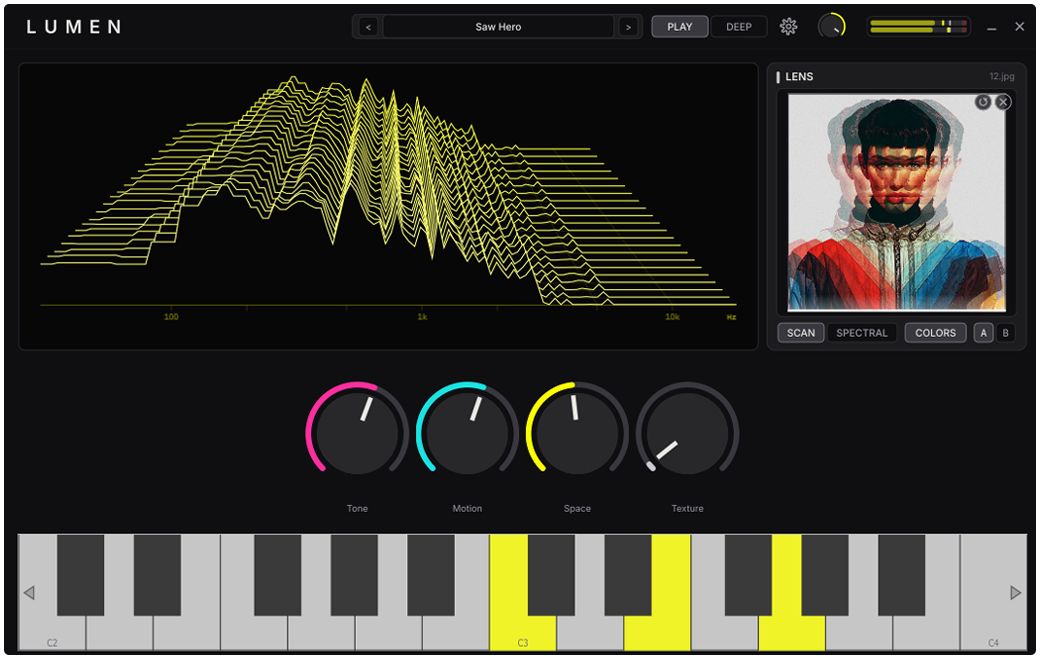
This is the Lens, live on the page: 24 pictures, one patch. Click an image and the synth plays it. The knobs land where the image's colors put them, and the ridgeline is the real spectrum of what you hear.

Free · Windows VST3 + Standalone · v1.0.0

What it is

One synth, four pillars

Lumen is a wavetable synthesizer built around a simple contract: on every patch, four knobs do something musical, and what you hear is always visible.

Wavetable engine

A living wavetable you can watch move. Sculpt the frame and the timbre shifts with it.

Four live knobs

Four macros shape the whole patch: Tone, Motion, Space, and Texture. One twist moves dozens of parameters at once.

The Lens

The Lens turns any image into a playable voice. Brightness, color, and detail map straight onto the sound.

The waterfall

A live spectrum falls away as the patch plays. You hear the sound and watch its shape at the same time.

Factory bank

32 presets. Click one. Hear it.

This is Lumen's real preset browser, rebuilt for this page. Pick any patch and its clip plays: every clip was rendered by Lumen's own command-line engine, so what you audition is the actual synth, and the waterfall beside it redraws from the exact audio you are hearing. In the app, patches you save show up in this same browser the moment you save them, under a User section at the end of the menu.

Bass
Leads
Pads
Keys
Textures
Blank slate
Slow AuroraDEFAULT
The opening patch, a pad that blooms.
0:00 / 0:00

Audio loads only when you press play; nothing streams until you ask.

Download

Free. No account, no email.

Windows

One zip, two builds: the VST3 for your DAW and a standalone app that needs nothing else.

Lumen 1.0.0 · Win64 zip

Windows 10/11, 64-bit · VST3 host or standalone · WASAPI out of the box (ASIO supported)

macOS

In development. Lumen is built on a cross-platform foundation and a macOS build is planned, but it isn't ready yet, and we won't ship one we haven't tested on real hardware.

Want to know when it lands? Watch the GitHub repository; releases show up there first.

Install

  1. Unzip the download anywhere.
  2. VST3: copy Lumen.vst3 to C:\Program Files\Common Files\VST3, then rescan plugins in your DAW.
  3. Standalone: run Lumen.exe from wherever you like. Audio and MIDI settings live behind the gear icon; your device choice is remembered.
Windows SmartScreen: the first launch may warn about an unknown publisher, because Lumen is a free, unsigned indie build. Click More info → Run anyway. If that makes you uncomfortable (fair), you can build it from source instead.
Quick start

The first five minutes

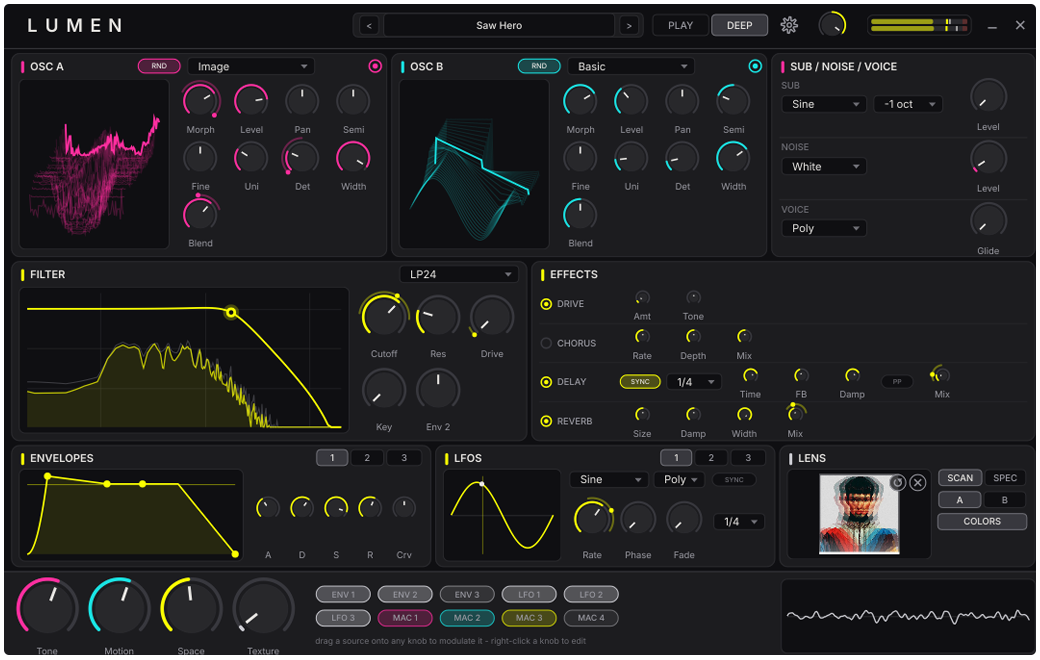
Lumen opens on Slow Aurora, a slow-blooming pad, and stays silent until you play. Two views cover the whole instrument: PLAY for performing, DEEP for the engine. The numbered pins hold the detail; point at one, or tab to it.

Use your MIDI keyboard or the on-screen keys. The waterfall starts drawing the sound immediately; that picture is live analysis, not decoration. Play off the visible range and the keyboard follows you by octave. The < > steppers by the preset name walk all 32 factory patches. The four knobs land at different resting spots per preset; the positions are part of each patch's character. Tone, Motion, Space, Texture. On every preset all four do something worth automating, and they map to the first four knobs on your controller once MIDI Learn is set up. Drag any photo onto the Lens panel. Each note now travels through the picture, the Motion macro scales how fast, and the white beam shows where in the image the sound is right now. PLAY is the performance view. DEEP opens the full engine: oscillators, filter, envelopes, LFOs, the mod matrix, FX.
  1. Play something. Keys or MIDI; the waterfall draws it live.
  2. Step through the bank. The steppers walk all 32 patches.
  3. Grab the four macros. All four earn their knob on every preset.
  4. Drop an image. Every note then travels through the picture.
  5. Go deeper when ready. DEEP opens the full engine.
Preset step < > Views PLAY / DEEP Settings gear Save Save Preset…
The Lens

Drop an image. Hear it.

The Lens is Lumen's image-to-tone engine. It reads the actual bytes of your picture and turns them into a wavetable, a harmonic recipe, and a macro gesture. Deterministically: the same image always makes the same sound.

Colors

With COLORS on (the default), the image's overall color character drives the four macros: a warm photo and a cold one land the knobs in different places before you play a note. It is a live Lens mode in the same family as Scan and Spectral, not a saved property of the patch. Turn it off and only the image's structure speaks; the macros stay where you left them.

The journey is reversible

When an image is loaded, every note travels the whole picture over its lifetime: attack at one edge, release at the other, with the Motion macro scaling the travel speed. In the app, the full-height white beam over the image is the playhead. The trip is also safe. Dropping an image blends onto your current patch instead of erasing it; Lumen snapshots your settings the moment the image lands, and clearing it restores them exactly, including hand-tweaked knobs.

Try this first: load Init, drop a photo with a strong horizon (a beach, a skyline), play one long note in Scan mode, and watch the beam cross the image while the waterfall redraws the timbre. That's the whole idea in one note.
Lumen in PLAY view: waterfall, Lens panel, four macro knobs, keyboard
PLAY · the performance view
Lumen in DEEP view: oscillator, filters, envelopes, mod matrix, FX
DEEP · the full engine
Sound design

Making your own sounds

Three recipes, easiest first. Each starts from Init, the blank patch at the end of the preset menu, and ends with Save Preset…, which files your sound under your own User section in the browser. Name it; that's the whole dialog.

Recipe 1: A photo pad

  1. Load Init and drop a photo you like onto the Lens; COLORS moves the macros to the image's character.
  2. Try Scan and Spectral; landscapes usually scan, architecture goes spectral.
  3. In DEEP, slow the amp envelope: long attack, long release, so each note blooms.
  4. Pull Motion down until the movement feels like weather, then Save Preset…

Recipe 2: A mono glide bass

  1. From Init, set the voice mode to Mono in DEEP and raise Glide until slides feel elastic.
  2. Pick a wavetable position with low-end weight, close the filter partway, and add drive.
  3. Route velocity to filter cutoff in the mod matrix: soft playing is round, hard playing digs.
  4. Shorten the amp release, watch the low end on the waterfall, then Save Preset…

Recipe 3: Designing to the four-knob contract

  1. Build any sound you like, then assign the four moves a player would want on stage to the macros.
  2. Set each macro's resting position so the knobs look like the sound: pads rest low, leads rest hot.
  3. Sweep every macro end to end; if a range turns to mush, shrink it in the matrix.
  4. When all four stay musical, Save Preset…
House rule from the factory bank: every one of the 32 presets passes an automated check that each macro actually sweeps somewhere (no dead knobs) and rests sound-neutral. Hold your own patches to the same bar and they'll feel factory-grade.
Under the hood

How the engine works

Signal flows left to right; modulation rains down from above. Everything continuous is smoothed (~20 ms), everything on the audio thread is allocation-free, and the waterfall taps the final output. What you see is literally what you ship.

image → wavetable ENV 1·2 / LFO 1·2 VEL · WHEEL · AT · PB MACROS ×4 LENS · image + color MOD MATRIX WAVETABLE OSC morph · mip-mapped poly · mono · legato · glide SVF FILTER LP/BP/HP · drive audio-rate safe FX space · movement LIMITER ceiling OUT WATERFALL · analysis tap
audio path macros lens env · lfo · midi mod

The parts, in one line each

StageWhat it does
Wavetable oscillatorsMorph smoothly through frames; mip-mapped tables keep high notes alias-clean. Voice modes: poly, mono, legato, with glide.
The LensTurns image bytes into wavetables (Scan/Spectral) and color into macro positions. Deterministic, so patches recall bit-exact.
SVF filterState-variable filter with a drive stage; stays stable even with cutoff modulated at audio rate.
Mod systemEnvelopes, LFOs, MIDI sources and the four macros meet in a routing matrix with per-route depth.
FX + limiterSpace and movement, then a safety ceiling. Presets are designed with real headroom rather than leaning on the limiter.
WaterfallLive spectral history of the actual output, drawn over the grid. Analysis, not animation.

Numbers the factory holds itself to

Preset loudness −20…−8 dBFS RMS at vel 100 Clipping none, bank-wide Aliasing measured per preset Params 96 · all smoothed Audio thread zero allocation

Every one of these is checked by an automated render-and-measure harness, not by ear alone. More on that in How it's built.

MIDI & control

Your hardware, mapped once

MIDI Learn

  1. Right-click any knob or control and choose Learn.

  2. Move a knob or fader on your hardware. Bound.

  3. That's it. The map is saved globally and survives restarts, so you map your controller once, not per project.

The map lives at %APPDATA%\Lumen\midi_map.xml. Delete the file to start over; right-click a mapped control and choose unlearn to clear one binding.

Voice modes & glide

The VOICE panel in the DEEP view: a sine sub an octave down and a white-noise layer, each with its own level, and the voice mode set to Mono with glide partly raised.

Poly for chords; Mono for basses and leads with last-note priority; Legato keeps envelopes from retriggering on overlapped notes. Glide slides pitch between notes: the classic portamento lead and the elastic bass both live here.

Performance MIDI

Your playing already carries five control signals, and Lumen reads every one of them.

Velocity Sustain CC64 Mod wheel CC1 Aftertouch Pitch bend

All five show up as sources in the mod matrix, the same boxes that feed the routing grid in the engine diagram above.

Standalone audio

WASAPI works out of the box with any interface; ASIO is supported. Pick your device behind the gear icon and the choice persists.

Provenance

How Lumen was built

Lumen was built by a human and an AI working as a pair: a person acting as designer, ear, and final judge, and an AI coding agent (Claude Code) writing the C++ and, unusually, verifying its own work before the human ever heard it.

Spec first, phases with gates

The entire synth was specified before the first line of code: a design document (what to build), a phase plan (the order, with explicit acceptance criteria per phase), and a rules file the agent reloads every session. Eight phases (engine core, filter and FX, modulation, the waterfall, the Lens, presets), each one tagged in git only after every acceptance criterion was demonstrated, and every decision along the way logged to a running DECISIONS.md.

An agent that listens with instruments

The agent can't hear, so the project gave it instruments instead of ears. A command-line render tool plays any preset headlessly and measures the result: loudness, clipping, DC offset, tuning error, aliasing floor, attack and release times. After every engine change, the agent renders audio and reads the numbers. After every interface change, it launches the app, screenshots itself, and inspects the image. The human ear was reserved for the one thing it's actually needed for: taste.

Guarantees, not promises

Preset stability SHA-256 proofed: UI work provably never changed the sound Plugin validation pluginval, max strictness Compiler warnings = errors Lens deterministic: same image, same sound, forever No dead knobs unit-tested

Two of these deserve a sentence. First: every time the interface was restyled, all 32 factory presets were re-rendered and byte-compared against their previous renders, so cosmetic work was proven, not assumed, to leave the sound untouched. Second: the four-knob contract (every macro musical, every rest position sound-neutral) is enforced by tests, so it can't quietly rot.

What the human did

Everything a metric can't: chose what Lumen should be, judged whether patches were worth keeping, decided the default sound, caught what only a live window shows (a squished label, a popup's corners, knobs that didn't spring back), and called the taste questions, like whether dropping an image should blend with your patch or replace it. (It blends. It's reversible. That was a deliberate call.)

Curious about the approach? The repository's SPEC.md, PHASES.md, and DECISIONS.md are the honest record: the design, the gates, and every trade-off, in the order they actually happened.

FAQ

Troubleshooting & answers

My DAW doesn't see Lumen after install

Confirm Lumen.vst3 is in C:\Program Files\Common Files\VST3, then force a plugin rescan in your DAW (most hide it in plugin settings; some need a "clear cache and rescan"). Lumen is 64-bit VST3 only, so 32-bit hosts and VST2-only hosts won't find it.

Windows warns me about an unknown publisher

Expected for now: Lumen is free and the binaries aren't code-signed yet. More info → Run anyway proceeds. Only download Lumen from this page or the project's GitHub releases, so you know what you're running.

No sound in the standalone

Open the gear icon and check the output device: pick your interface (WASAPI) and confirm the sample rate. Then play a note and watch the output meter in the header: if the meter moves but you hear nothing, the problem is downstream of Lumen (system mixer, monitor routing).

Where do my saved presets and settings live?

User presets are saved under the app's Presets\User folder and appear in the User section of the preset menu. The MIDI map and standalone audio settings live under %APPDATA%\Lumen. Copy those folders and you've backed up everything personal.

Do patches made from images recall correctly if I move the image file?

Yes. The Lens result is baked into the patch state when you save, so presets recall bit-exactly even if the original photo is renamed, moved, or deleted.

Why does dropping an image move my knobs? Can I undo it?

That's COLORS, the image's color character steering the four macros. It's fully reversible: remove the image and every knob returns exactly where it was, including positions you'd set by hand. Prefer the image to leave your knobs alone? Toggle COLORS off; it stays off until you turn it back on.

Is Lumen really free? What's the catch?

Really free, for any use, including commercial music. No account, no email capture, no locked presets. It exists because building it was the point.

macOS? Linux?

macOS is planned: the codebase is cross-platform-ready, but we won't publish a build we haven't tested on real Apple hardware. Linux isn't on the roadmap for 1.x.